To digitise a blood pressure record, transfer each original measurement into a dated row and check it against the source. Enter handwritten logs manually; use BPBook’s photo tool for supported monitor-display images, then review the suggestions. Keep uncertain dates or identities on a review list instead of guessing.
Choose the method that matches the source
| Your source | Practical route | Check before using it |
|---|---|---|
| Handwritten paper diary | Enter the readable rows into a spreadsheet or log | Handwriting, dates and separate repeated measurements |
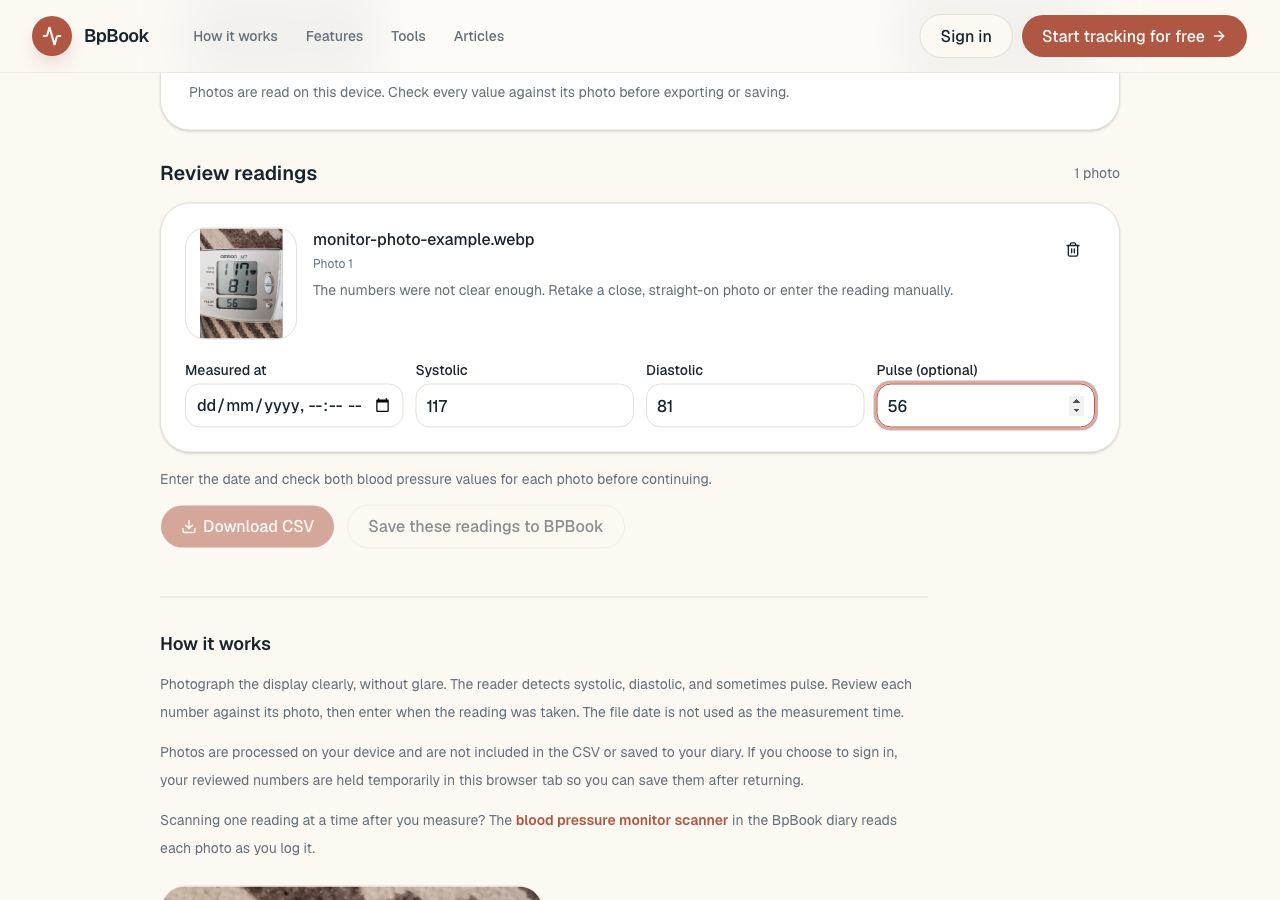
| Photos of a monitor display | Extract suggested numbers, then review each photo | Values, person and actual measurement time |
| Existing CSV export | Keep a copy, then inspect the imported columns | Date convention, units, row counts and duplicates |
The Heart Foundation's recording guidance allows a paper or digital diary. Changing format is an organisation choice; it does not make a measurement more accurate.
Keep the source beside the new rows
For a paper log, work through a small section at a time. Enter one measurement per row, including its original date, time and pulse if present. Then compare that section with the paper before continuing. Keep the paper or a readable copy while you resolve mistakes.
Do not silently combine two consecutive measurements into one entry. Keep both, even when their numbers happen to match. The logging guide explains the fields a useful record retains.
For monitor photos, BpBook's photo-to-CSV tool accepts up to 30 JPEG, PNG or WebP images, each under 5 MB. It suggests displayed pressure values and sometimes pulse. Compare every suggestion with its image before exporting. It is a monitor-display workflow, not a supported handwriting or paper-table scanner.
Resolve the date before sorting
| Source detail | What remains uncertain | Useful action |
|---|---|---|
| 05/09/2026 on paper | 5 September or 9 May? | Confirm the writer's convention before converting |
| Photo file created 14 October | When was the displayed reading measured? | Check the monitor history or original notes |
| Two rows both show 128/82 | Two attempts or the same event entered twice? | Compare times and source references |
BpBook's batch tool does not use the photo's file date as the measurement time. Enter the original time you can establish. If it is unknown, keep that item on a review list; inventing a time to satisfy an input field makes the history less useful.
Check the result before replacing your working copy
Count the source measurements and the transferred rows. Inspect the start, middle and end, and check any unusually similar entries against their sources. Confirm whose record the rows belong to before importing or sharing them.
Monitor-photo processing happens on your device. The photos are not included in the exported CSV or saved to a diary by that flow, so keep originals separately when you need a reference. Downloading a CSV requires no account; choosing to sign in and save reviewed readings is a separate action.
Open the finished CSV yourself before relying on it. You can use the graph maker to inspect the dated record, while keeping the source rows and unresolved questions available.
Frequently asked questions
Can BPBook scan my handwritten paper table?
The photo tool supports monitor-display images, not handwriting or paper-table OCR. Transfer readable paper rows manually and check them against the source.
Does the CSV include the original photos?
No. It contains the reviewed reading fields. Keep the photos separately if you need them for checking the record later.
Sources
- Heart Foundation Australia: recording each reading
- NHS: blood pressure recording and device instructions
- BpBook: current monitor-photo tool and its processing limits
Sources and public BpBook tool descriptions checked 20 October 2026. This is a transcription workflow; it does not interpret the measurements.