Blood pressure monitor scanner
Take a photo of your monitor's screen and BpBook fills in the systolic, diastolic and pulse numbers. You check them, then save the reading to your diary.
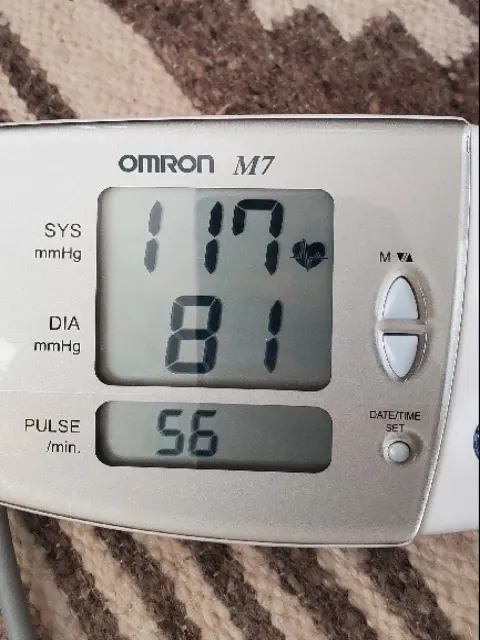
Check the reading
Compare each number with your monitor before saving.
- Systolic
- 117mmHg
- Diastolic
- 81mmHg
- Pulse
- 56bpm
How to scan your blood pressure monitor
- 1
Choose Use a photo
Select Log measurement in your diary, then Use a photo. Take a new picture or choose one from your phone.
- 2
Check every number
BpBook shows what it read beside your photo and flags any value it is less sure about. Correct anything that does not match.
- 3
Save with the right time
Confirm the date and time you measured, add a note if you like, and save. The reading appears in your chart and history.
Tips for a photo that reads well
A clear photo makes scanning faster and leaves less to correct.
Shoot straight on
Hold your phone parallel to the monitor so the digits are not slanted or stretched.
Avoid glare and shadows
Tilt the monitor slightly away from lamps and windows. Reflections over a digit are the most common cause of misreads.
Fill the frame with the display
Get close enough that the screen takes up most of the photo, with every digit fully in view.
Photograph the result right away
Take the photo while the monitor still shows the reading, so the time BpBook saves matches when you measured.
Private by design, with other ways to add readings
Read on your device
The photo is processed in your browser and is not stored. Your diary keeps only the numbers, time and notes you save.
Many readings at once
Have a backlog in your monitor's memory? Scan up to 30 photos together and download them as a CSV, or save them to your diary.
Photos to CSV toolOr simply type it
Manual entry is always available, with large fields for systolic, diastolic and pulse. Use whichever is quicker for you.
Scanner questions
- Will the scanner work with my monitor?
- It works best with the segmented digital displays found on most home blood pressure monitors. Unusual fonts, very small displays or heavy glare can be harder to read. If a reading does not scan well, type it in instead.
- Is my photo uploaded or stored?
- No. The photo is read by a model that runs in your browser, and it is not saved to your diary or sent to BpBook's servers. Only the numbers you confirm are saved.
- What happens if a number is read wrongly?
- Nothing is saved until you confirm it. BpBook highlights values it is less sure about, and you can correct any number before saving. Pulse reading is newer, so check it carefully.
- Does scanning check whether my monitor is accurate?
- No. Scanning copies the numbers on the screen. The accuracy of the measurement itself depends on a validated monitor, the right cuff size and a consistent routine.
Good scans start with good measurements
The scanner copies what your monitor shows. Measuring the same way each time keeps your record useful.