Blood pressure,
a little simpler.
Record your readings, follow your patterns, and bring a clear picture to your doctor.

Good morning!
Your daily check-in
- M
- T
- W
- T
- F
- S
- S
Morning
124 / 78 mmHg
8:15 am
Evening
Ready when you are
Your readings.
The bigger picture.
A daily check-in is just the start. Your diary keeps your latest reading, recent averages and longer-term trends together.
From a quick look today to a report for your next appointment, the details are here when you need them.
Latest reading
126/81mmHg
7-reading average
130/81mmHg
Average pulse
68bpm
This month
41readings
Blood pressure over time
Read from photo
117 / 81, pulse 56
Doctor report
PDF ready
How it works
Three simple steps to a useful blood pressure log.
From your first reading to your next appointment. BpBook keeps the details together, with Mochi along for the everyday.
Snap a photo of your monitor or type your numbers. Check the reading, add a note, and save it to your diary.
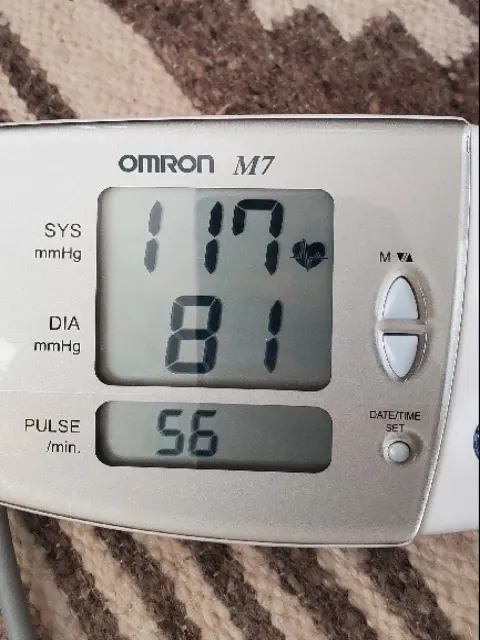
Check the reading
Compare each number with your monitor before saving.
- Systolic
- 117mmHg
- Diastolic
- 81mmHg
- Pulse
- 56bpm
Blood pressure monitor scanner
Scan your blood pressure monitor instead of typing.
Take a photo of your monitor's screen and BpBook fills in the reading for you to check.
Take or upload a photo
Photograph the display straight on, without glare.
Review the numbers
Compare systolic, diastolic and pulse with your monitor and correct anything that looks wrong.
Confirm and save
The reading joins your diary with its date and time.
Photos are read in your browser and are not saved. Scanning can misread some displays, so you always confirm the numbers. Prefer typing? Manual entry is one tap away.
How monitor scanning worksCheck the reading
Compare each number with your monitor before saving.
- Systolic
- 117mmHg
- Diastolic
- 81mmHg
- Pulse
- 56bpm
Understand your blood pressure trends.
See systolic, diastolic and pulse on one chart, then look back at any reading in your history.
Reading history41 readings
126 / 81 mmHg
No notes
73 bpm
27 Sept, 7:15 pm
131 / 82 mmHg
No notes
64 bpm
27 Sept, 7:30 am
133 / 85 mmHg
Slept poorly
64 bpm
26 Sept, 7:30 am
124 / 77 mmHg
No notes
71 bpm
25 Sept, 7:15 pm
135 / 82 mmHg
No notes
69 bpm
25 Sept, 7:30 am
Systolic and diastolic together
Both numbers on one chart, so changes are easy to spot.
Pulse alongside
Your heart rate is charted with every reading that includes it.
This month or all time
Switch views, or pick any date range for a report.
Complete reading history
Every reading listed by date and time, with your notes.
Notes and context
Add a note, such as a missed dose or a poor night's sleep.
Gentle reminders
Set measurement reminders, with optional Google Calendar sync.
BpBook shows your own readings. It does not label, diagnose or interpret them. Talk to your clinician about what your numbers mean.
BpBook measurement record
Blood pressure report
1 Sep 2026 to 27 Sep 2026
Overall average
127.9 / 80.9
mmHg
Readings
41
Days recorded
27 of 27
Morning average
130.4 / 82.4
27 readings
Evening average
123.2 / 77.9
14 readings
| Date / time | Systolic | Diastolic | Pulse | Notes |
|---|---|---|---|---|
| 27 Sept, 7:15 pm | 126 | 81 | 73 | None |
| 27 Sept, 7:30 am | 131 | 82 | 64 | None |
| 26 Sept, 7:30 am | 133 | 85 | 64 | Slept poorly |
| 25 Sept, 7:15 pm | 124 | 77 | 71 | None |
Doctor-friendly reports
Better records for better conversations with your doctor.
Leave the handwritten notes and monitor memory behind. Bring one clear report instead.
- Readings in date and time order, including repeats and notes
- Overall, morning and evening averages for the dates you choose
- A chart of systolic and diastolic readings over the period
- Download as PDF or CSV, or share a private read-only link that expires after 30 days
Everything you need in one place.
A complete blood pressure tracker that stays simple to use.
Blood pressure diary
Every reading with its date, time, pulse and notes, kept in one private diary.
126 / 81 mmHg
No notes
73 bpm
27 Sept, 7:15 pm
131 / 82 mmHg
No notes
64 bpm
27 Sept, 7:30 am
Monitor photo scanning
Photograph your monitor and check the numbers BpBook reads.
Manual reading entry
Prefer typing? Large, clear fields for systolic, diastolic and pulse, plus optional details.
Historical trends and charts
Follow your readings this month or across your whole history.
Doctor-friendly reports
A PDF with averages, a chart and your original readings for any date range.
Data export and sharing
Export everything as CSV, import past readings, or share a read-only link.
Access across devices
Sign in from any browser on your phone, tablet or computer. Add it to your home screen for one-tap access.
Reading history and organisation
Browse past readings by day, edit mistakes, and keep separate diaries for family members you look after.
789101112131415161718192021222324252627
Free blood pressure tools.
Quick, private calculators and templates. No account needed, and your readings stay in your browser.
- Blood pressure photos to CSVUseful when your monitor holds weeks of readings and you want them in a spreadsheet.
- Printable blood pressure logUseful when you prefer paper or Excel, or your clinic asked for a 7-day log.
- Blood pressure graph makerUseful when you have readings in a spreadsheet and want to see them as a chart.
- Blood pressure report PDFUseful when you need a one-off report for an appointment without creating an account.
- Blood pressure average calculatorUseful when you were asked for an average of several home readings.
- Cuff size guideUseful when you are buying a monitor or unsure your cuff fits your arm.
- Pulse pressure calculatorUseful when you want the difference between your systolic and diastolic numbers.
- See all free tools
Your blood pressure diary, wherever you go.
Mochi is already here in your web diary: a little company for your morning and evening check-ins.
We are building a dedicated BpBook app for quicker logging on the go. It is not in the App Store or Google Play yet.
Using your phone today? Open bpbook.app in your phone's browser, sign in, and add it to your home screen. It opens like an app, with the same diary, scanning and reports.
A day with Mochi
Example dayA little care, twice a day.
Your capybara companion for the everyday.
Morning
124 / 78
8:15 am · mmHg
Evening
Ready when you are
One small check-in
Web diary preview with example readings
Measure well, record well.
Short, practical guides based on advice from major heart health organisations.

Frequently asked questions
Straight answers about tracking, scanning and sharing your readings.
What is BpBook?
BpBook is a free online blood pressure diary. You record systolic, diastolic and pulse readings, follow them on charts, and create reports to share with your doctor. It is a personal record, not a medical device, and it does not diagnose or treat any condition.
How do I track my blood pressure online?
Create a free account, then add each reading after you measure. Type the numbers or take a photo of your monitor. BpBook saves the date and time, keeps your history in order, and charts your readings as they build up.
How to measure blood pressure at homeCan I record blood pressure readings without an app?
Yes. BpBook runs in the web browser on your phone, tablet or computer, so there is nothing to install. If you would rather use paper or a spreadsheet, the free blood pressure log has printable and Excel versions that work without an account.
Free blood pressure logCan I scan my blood pressure monitor?
Yes. Take or choose a clear photo of the monitor screen and BpBook reads the systolic and diastolic numbers, and the pulse when it can. The photo is read in your browser and is not saved to your diary. Glare, angle and display style can cause mistakes, so check every number against your monitor before saving. You can always type a reading instead.
How monitor scanning worksCan I share my readings with my doctor?
Yes. You can download a PDF report, export your readings as a CSV file, or create a private read-only link that expires after 30 days. You choose whether notes are included in the link, and you can turn it off at any time.
How to share readings with your doctorCan I download a blood pressure report?
Yes. Choose a date range and download a PDF with your overall, morning and evening averages, a chart, and optionally every original reading. A CSV download is also available. Without an account, the free report generator creates a similar PDF from readings you paste in.
Free blood pressure report generatorIs BpBook free?
Yes. The diary, charts, monitor scanning, reports and exports are free to use, and so are the tools on this site. You only need a free account to save readings to a diary.
Can I use BpBook on my phone?
Yes. BpBook works in the browser on iPhone and Android phones, and you can add it to your home screen so it opens like an app. A dedicated mobile app is coming soon. It is not available in the App Store or Google Play yet.
Why is tracking blood pressure over time useful?
Blood pressure changes throughout the day and from day to day, so a single reading says little on its own. Heart health organisations recommend home monitoring because readings taken at consistent times give you and your clinician a fuller picture than occasional clinic visits. BpBook keeps that record organised. Your clinician interprets it.
Why home and clinic readings differYour next small step starts here.
A free blood pressure diary. A little company along the way.